Use the Rational®
ClearQuest® Report Server
for Crystal Reports to run data-pull reports on the ClearQuest Web server. Use the Report Launcher for
Rational
ClearQuest to provide access to reports
on a shared file server.
The Rational
ClearQuest Report
Server for Crystal reports is an optional ClearQuest component that can be installed with the
Rational Installation Manager. The server works
together with the Crystal Reports, version for Eclipse (formerly Crystal Reports Java™ Reporting Component (JRC)) to start SAP Crystal Reports
from ClearQuest. The Crystal Reports, version for
Eclipse is a separate component available from SAP that must be installed and configured along
with the Rational
ClearQuest Report Server for
Crystal Reports. Attention: SAP has changed the name of
Crystal Report viewer, from "Crystal Reports Java Reporting Component (JRC) to "Crystal Reports,
version for Eclipse". ClearQuest still works
with JRC, but it is recommended that you upgrade to the latest Eclipse version. If you upgrade,
you should also upgrade Crystal Rerport Designer "SAP Crystal Reports 2025".
You can use the Rational
ClearQuest Report
Launcher to run Crystal Reports by deploying it on the same WebSphere® server where the Rational
ClearQuest Report Server for Crystal Reports is
deployed.
The following figures provide examples of how you might configure the Rational
ClearQuest server components. You might decide to
configure these components based on the server load, or your preference to have a dedicated WebSphere Application Server for reporting.
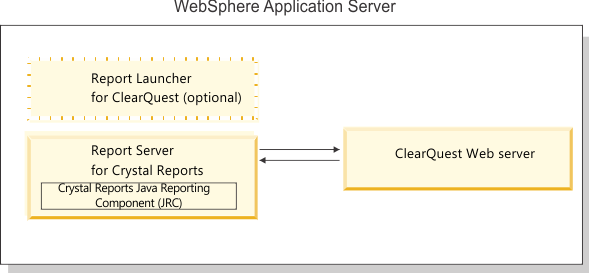
In the first figure, the Rational
ClearQuest
Report Server for Crystal Reports and the Rational
ClearQuest Web server reside in the same IBM®
WebSphere Application Server instance.
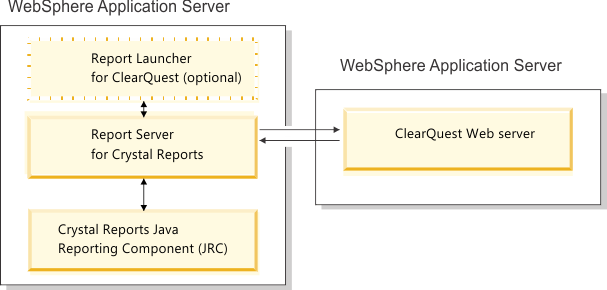
In the next figure, the Rational
ClearQuest
Reports Server for Crystal Reports and the ClearQuest Web server reside in separate WebSphere Application Server instances.